---
title: "Lets Talk About Version Control"
author:
- "Dr Stephen J Newhouse"
- "Dept. Biostatistics and Health Informatics"
date: "10/04/2018"
output:
revealjs::revealjs_presentation:
theme: serif
highlight: tango
transition: fade
reveal_options:
slideNumber: true
progress: true
---
## *How you will all learn to stop worrying about Version Control and learn to love Git and GitHub!*
**All credit to:** Jenny Bryan https://twitter.com/jennybryan. **Excuse me, do you have a moment to talk about version control** [Bryan J](https://twitter.com/jennybryan). Am Stat. 2017;5:1-23.doi:10.7287/peerj.preprints.3159v2
## Overview
- Describes the use of the version control system **Git** and and the hosting site **GitHub** for statistical and data scientific workflows.
- Do not provide step-by-step instructions on how to use Git and GitHub.
- Present what the workflow feels like and what the payoffs are, with special attention to the statistics and R context.
- The goal is to help the Git-curious generate the activation energy needed to get started.
- **URL: Git: [https://git-scm.com](https://git-scm.com)**
- **URL: GitHub: [https://github.com](https://github.com)**
## The Problem
- Data analysis, Bioinformatics, statistical research, have at least one thing
in common: these activities all produce many files!
- Data files, source code, figures, tables, prepared reports, and much more
- Files evolve over the course of a project and often need to be shared with others, for reading or edits
- Without explicit and structured management, project organization can easily descend into chaos, taking time away from the primary work and reducing the quality of the final product.
- This can be avoided by repurposing tools and workflows from the software development world, namely, distributed version control.
## Why Git?
Why would a statistician use a version control system, such as Git (https://git-scm.com)?
And what is the point of hosting your work online, e.g., on GitHub (https://github.com)?
*Could the gains possibly justify the inevitable pain?*
**Oh Yes Indeed!!!**
There are many benefits of using hosted version control in your statistical practice:
## Why Git?
- **Your work becomes tightly integrated with organizing, recording, and disseminating it** (It’s not a separate, burdensome task you are tempted to neglect).
- **Collaboration** is more structured, with powerful tools for asynchronous work and managing versions.
- Little effort required to **create a web presence for a project**.
- GitHub makes a great **course management system** for courses that use R. You can exchange actual working code with your students and explore the associated results.
- By using common mechanics across work modes (research, teaching, analysis), you achieve basic competence quickly and avoid the demoralizing forget-relearn cycle.
## Now the bad news
- Git was built neither for the exact usage described here, nor for
broad usability.
- New Git users will notice this, so it’s best to know in advance.
- Happily, there are many helpful tools that mediate your interactions with Git.
- **GitHub** itself is a great example, as is **RStudio** (an R Integrated Desktop Environment).
- In addition to pointing out tools that soften Git’s sharpest edges, *Jenny B recommends* specific habits and attitudes that reduce frustration...
## What is Git?
- Git is a **version control system**.
- Git manages the evolution of a set of files – called a **repository** or **repo** – in a sane, highly structured way.
- Like the “Track Changes” feature from Microsoft Word, but more rigorous, powerful, and scaled up to multiple files.
## Git has been re-purposed by the data science community
- We use it to manage and share a motley collection of files
- data, figures, reports, and, source code.
- In a Git-based workflow, you document and, optionally, expose your work as you go.
- Communication and collaboration are the killer apps of version control.
- Enables the distribution of files across different people, computers, and time
## A hypothetical analysis of the iris data
## Without Git
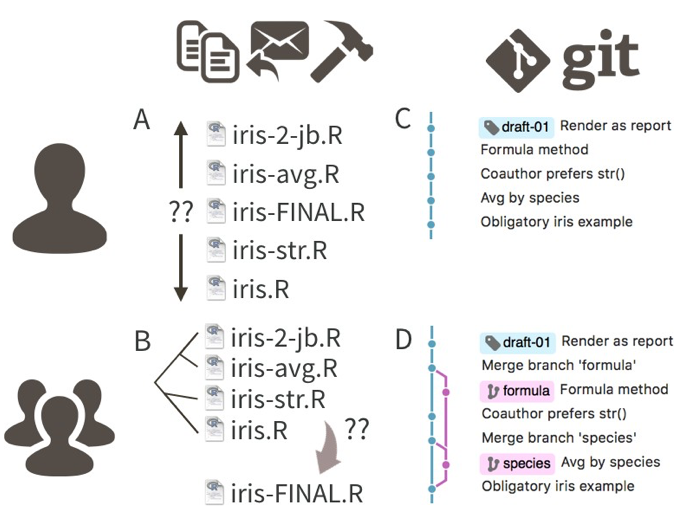
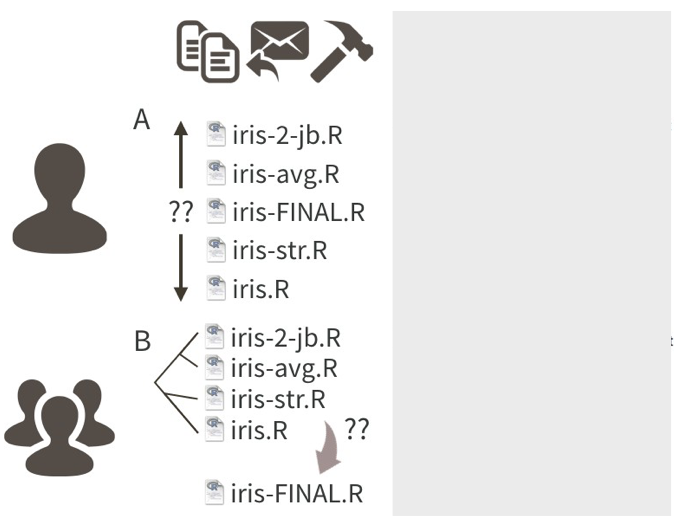
- Many people who don’t use Git unwittingly re-invent a poor man’s version of it.
- A single R source file `iris.R` is can become a messy beast to track..
- Contributors create copies of `iris.R`, appeding the file name with initials, dates, and other descriptors.
- Leads to multiple versions of `iris.R` of indeterminate relatedness.
- In collaborative settings based on email distribution, the original file becomes part of a complicated phylogeny that no amount of “Track changes” and good intentions can resolve.
## Without Git
## The Git Way
- The Git way is to track the evolution of `iris.R`
- Through a series of **commits**, each annotated with an explanatory message.
- In a common collaborative Git workflow, where contributors work independently:
- Folks sync regularly to a common version
- Important versions/changes get a human-readable tag to signal a meaningful milestone.
- e.g `draft-01`
Yes, there is some pain in adopting the formalism of Git, but it is worth it.
## The Git Way
## GitHub 1
GitHub is like DropBox or Google Drive, but more structured, powerful, and programmatic.
## GitHub 2
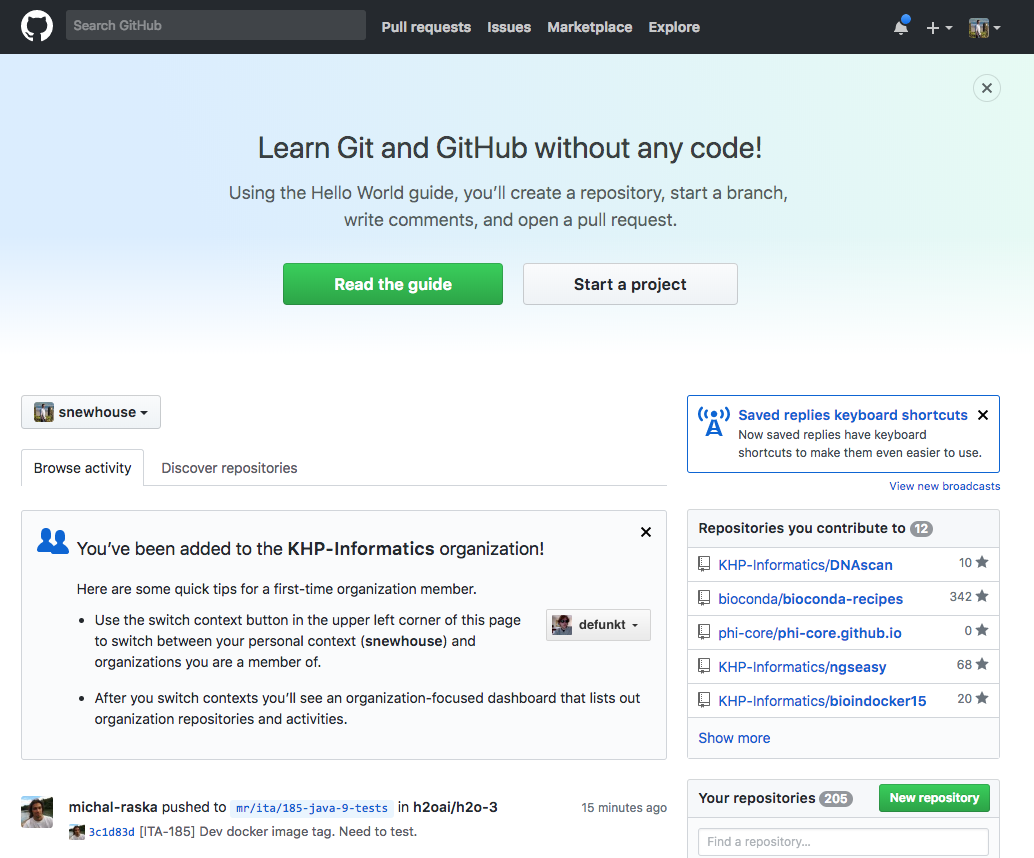
- GitHub complements Git by providing a slick user interface and distribution mechanism for Git repositories
- Git is the software you use locally to record changes to a set of files.
- GitHub is a hosting service that provides a Git-aware home for such projects on the internet.
## GitHub 3
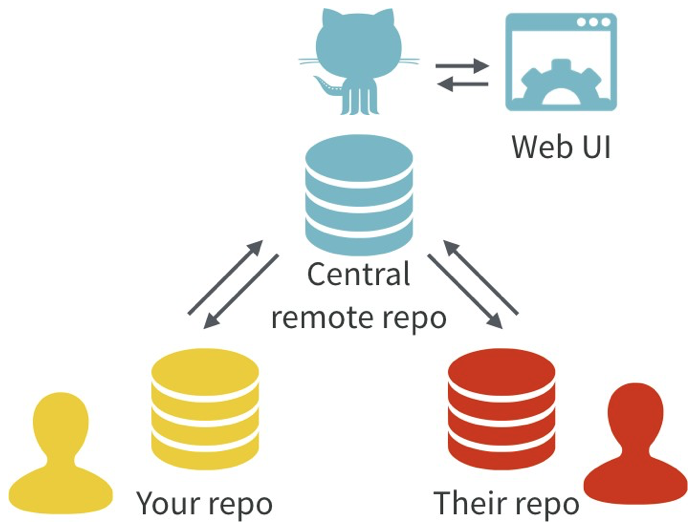
- With Git, all contributors have a copy of the repo, with all files and the full history.
- It is typical to stay in sync through the use of a central remote repo, such as GitHub.
- Hosted remotes like GitHub also provide access to the repo through a web browser.
## GitHub 4
- The remote host acts as the distributor for a Git-managed project.
- This allows others to browse project files, explore their history, sync up with the current version, and even propose or make changes.
- Many operations can be done entirely in the browser, including editing or adding files.
- It is easy to create a hyperlink to a specific file or location in a file, at a specific version, which can make meta-conversations about project code or reports much more productive.
- GitHub also offers granular control over who can see, edit, and administer a project.
## GitHub Issues 1
- GitHub **Issues** are another powerful feature of the platform.
- Rember that we are repurposing Git from a tool that facilitates software development.
- Think of the issues for a project as its bug tracker.
- For projects that are not pure software development, we co-opt this machinery to organize our to-do list...
## GitHub Issues 2
- The basic unit is an **Issue** and you can interact with one in two ways:
- First, issues are **integrated into the project’s web interface on GitHub**, with a rich set of options for linking to project files and incremental changes.
- Second, issues and their associated comment threads **appear in your email**
- The result is that **all correspondence about a project comes through your normal channels, but is also tracked inside the project itself, with excellent navigability and search capabilities**.
## GitHub Issues 3
- In **a data analysis project**, you might open an issue to flesh out a specific sub-analysis or to develop a complicated figure.
- In **a course**, you can use them to manage homework submission, marking, and peer review.
- Issues can be **assigned to specific people** and they can be **labelled**, e.g. “bug”, “simulation-study”, or “final-exam”.
- Coupled with the ability to cross-link issues and the project files or file changes, you have **extraordinary power to document why things have happened in the past and to organize what needs to happen in the future**.
## Initial system setup
- Register for a free account with GitHub.
- Install Git.
- Depending on your OS, Git might already be installed.
- Some basic configuration is needed, such as setting your username and email.
- Install a local Git client - a graphical user interface for Git (optional but highly recommended).
- If you are an R user, RStudio provides a great deal of this functionality.
- Others: SourceTree or GitKraken.
- Confirm, with a practice repository, that local Git can send and receive the current version of the repository on GitHub, known as pushing and pulling, respectively.
## Some general recommendations for agony reduction
- Consider using a graphical front-end for Git, a.k.a. a Git client, versus restricting yourself to the command line interface.
- Establish confidence in the basics (e.g. make a change, commit it, push it) before wading into more advanced usage (e.g. branching).
- Commit yourself to Git usage on a project that will provide sustained practice over several months.
- *Realize that no one is giving out Git style points. It’s OK to “power-cycle”, i.e. re- initialize the Git repository, to get unstuck.*
## Repositories
- For new or existing projects, you will:
- Dedicate a local directory or folder to it.
- Make it an RStudio Project.
- Optional but recommended; obviously only applies to projects involving R and users of RStudio.
- Make it a Git repository.
*The project is still a regular directory on your computer, that you can locate, name, move, and generally interact with as you wish.*
*You don’t have to handle it with special gloves!*
## Your Daily "Git" workflow
*edit > add > commit > push*
- Go about your usual business, writing R scripts, authoring reports in LaTeX or R Markdown.
- **`add`** the updated files to the git index
- instead of only saving individual files, periodically make a **`commit`**.
- takes a snapshot of all the files in the entire project.
- **`push`** commits to GitHub. This is like sharing a document on DropBox/sending it out as an email.
- By pushing to GitHub, you make your work and all your accumulated progress accessible to others.
*This is a moderate change to your normal, daily workflow. It feels weird at first, but quickly becomes second nature.*
## The basic git flow (bash)
A simple example..
```{bash, eval=FALSE }
## make some edits to big-analysis-script.R
sed -i 's/glm/glmnet/g' big-analysis-script.R
## add file to git index (get git to track uodated file)
git add big-analysis-script.R
## commit it: add useful descrption
git commit -m "updated ml workflow to use glmnet"
## push it to guthub
git push
```
- **RStudio will let you do this via a GUI**
- Make project dir an RStudio Project + initialize git
- It really is as easy as this!
- Google "git and RStduio tutorials"..
## Tip of the Iceberg
- A lot more to cover in [**Excuse me, do you have a moment to talk about version control**](https://peerj.com/preprints/3159/) Bryan J. Am Stat. 2017;5:1-23.doi:10.7287/peerj.preprints.3159v2 :
- Commits, diffs, and tags
- Markdown is special on GitHub
- Markdown is special for R users
- Which files to commit
- Collaboration
- Github as a web presence
- Where to go next
- Tutorials
## Thanks, Questions & Some URLS
- **Git: [https://git-scm.com](https://git-scm.com)**
- **GitHub: [https://github.com](https://github.com)**
- [Reproducible workflow and version control with Git and Github](http://jules32.github.io/2016-07-12-Oxford/git/)
- Google!